
Localization – a way to become a featured app on iTunes

You are a small team of developers and wondering how your app can beat those top developers’ apps and appear on iTunes App Store as a featured app? Carrot, a new productivity app that just got into the featured list, may have some insights for you.

Carrot, developed by Hong Kong startup Innopage, is an app where you can track and reward yourself for achieving your life’s to-do, goals and endeavors. Just like many of the developers out there, the next thing to do after shipping your app is to think of ways to attract more downloads and to climb up the different country top charts.


Downloads increased by 800% after localization


After reading researches showing that a lot of country top charts are dominated by apps that support the local language, Innopage decided that localization was the way to go to capture more international downloads. To begin with, they translated their app into 6 languages other than English, including French, German, Spanish, Japanese, Simplified Chinese and Traditional Chinese.

The result was very encouraging, just a few days after adding the above translation, downloads increased by 800% and the overall rankings in the above countries jumped significantly.


Became a featured app on iTunes after localization


Localization did not only help Carrot increase its downloads. Just a few days after adding the localized versions, Carrot became a featured app in iTunes App Store for 48 countries!
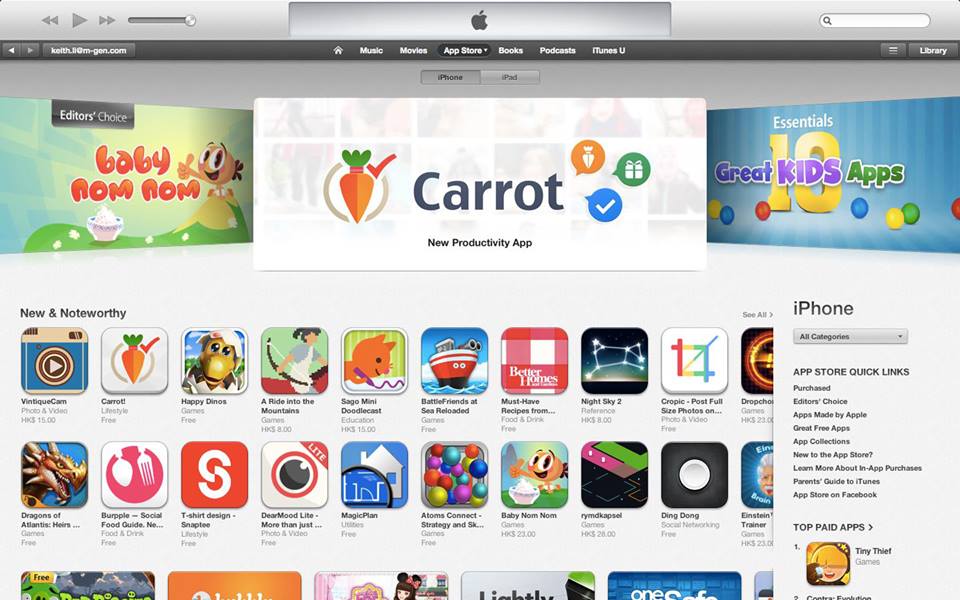
App featured on iTunes after localization

Keith Li, the CEO of Innopage, said “I will imagine that we, as a very small team based out of Hong Kong, wouldn’t be possible to get featured worldwide unless we do all those translations”.


Translating your app is easy with OneSky


Keith mentioned that the whole translation process was much easier than he expected. Using OneSky, all he needed to do was to upload his .strings files, choose the languages and our system would automatically parse the file to extract the human readable text and send them out for translation. With OneSky, you can forget about all the time-consuming file format conversions and you don’t have to worry whether the translators can handle those complicated code files.
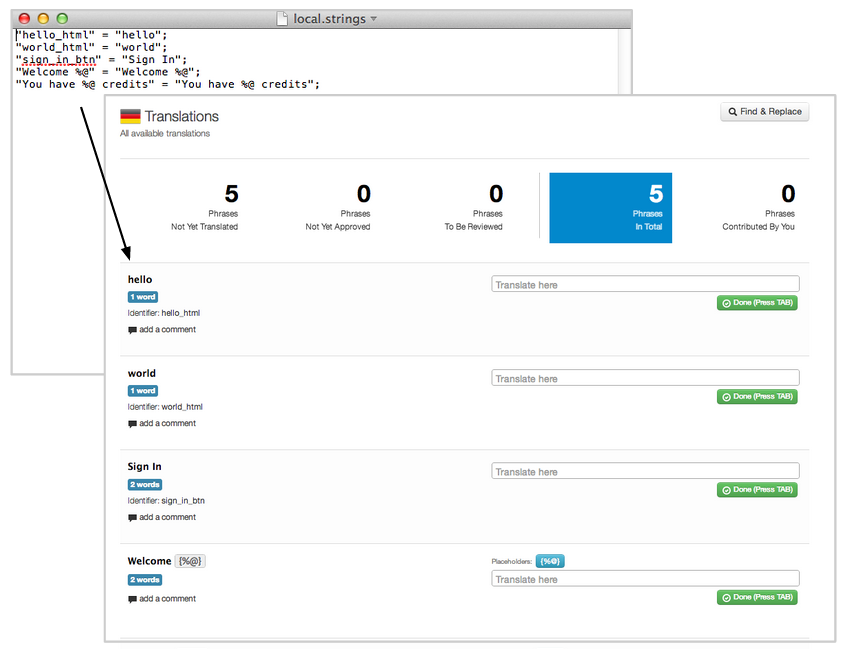
 

auto-parsing of resource files


“Another reason why we like OneSky is that there are many built-in features that help ensure translation quality. For examples, I can create a list of glossary terms and attach screenshots to provide more guidelines to translators. There is also an automatic placeholder validation system to ensure our translation contains no missing / misspelled placeholders. And the platform makes it very easy for me to communicate with the translators to clarify issues,” said Keith.

The whole translation process took less than 2 days to finish and Innopage could simply download the completed translation in ready-to-use resource files format and plug them into their app directly.

 With this promising result, Innopage is now planning to translate their app into more languages. Love the app and would like it to be translated into your language as well? Send us an email at support@oneskyapp.com and we will forward your voice to them!

More about Innopage

Innopage (www.innopage.com) is a multi-award winning, fast growing and leading Mobile Applications Developer specialized in iOS, Android, Windows Phone, Windows 8 and Smart TV applications development.

Innopage is a member of Hong Kong Cyberport Incubation Programme, and had received support from Hong Kong government’s Innovation and Technology Fund.


More about OneSky

OneSky (www.oneskyapp.com) is a cloud-based translation management platform with the mission to become the easiest way for companies to go global. We offer advanced technology to streamline the localization process for websites, mobile apps, softwares, social media & documents.

  • Professional translation service for 40+ languages

  • Manage your own translators & collaborate easily with our web-based translation editor

  • Crowdsourcing solutions to engage your users in the localization process

Translation made easy – our simple yet powerful promise to you. Contact us at support@oneskyapp.com for more info.
OneSky professional translation service: 50 languages & growing!

We are happy to announce that with our recent addition of Bulgarian, Croatian, Persian (Farsi), Romanian and Ukrainian, our professional translation service now covers 50 languages in total!

Below are some backgrounds of the 5 languages that we have added to our professional translation service coverage.


Bulgarian – According to an estimate, Bulgarian is spoken natively by over 10 million people and is mainly spoken in Bulgaria, Turkey, Serbia, Greece, Ukraine, Moldova, Romania, Albania, etc.

Croatian – Croatian is the official language of Croatia and one of the official languages of the European Union. It is estimated to be spoken natively by over 5 million people and it’s spoken mainly in Croatia, Bosnia and Herzegovina, the Serbian province of Vojvodina, etc.

Persian (Farsi) – Persian is the official language in Iran, Afghanistan and Tajikistan. It’s estimated that there are approximately 110 million Persian speakers worldwide.

Romanian – Romanian is the official language in Romania, Republic of Moldova, Vojvodina and Mount Athos in Greece. It’s estimated that Romanian is spoken natively by approximately 24 million people. Romanian speakers are scattered across many countries, including Italy, Spain, Bulgaria, Ukraine, the US, Canada, Israel, Russia, the UK, Portugal, Germany and France, etc.

Ukrainian – Ukrainian is the official language in Ukraine, It’s estimated that there are over 30 million native speakers of Ukrainian.

Source: Wikipedia 


With the additional of the above 5 languages, developers and companies can now order professional translation service for 50 languages on OneSky.

List of languages supported by OneSky professional translation service

  1. Afrikaans
  2. Arabic
  3. Bengali
  4. Bulgarian
  5. Catalan
  6. Chinese (Simplified)
  7. Chinese (Traditional – Taiwan)
  8. Chinese (Traditional – Hong Kong)
  9. Croatian
  10. Czech
  11. Danish
  12. Dutch
  13. English
  14. Estonian
  15. Finnish
  16. French (Canada)
  17. French (France)
  18. German
  19. Greek
  20. Hebrew
  21. Hindi
  22. Hungarian
  23. Indonesian
  24. Italian
  25. Japanese
  26. Kannada
  27. Korean
  28. Latvian
  29. Lithuanian
  30. Malay
  31. Malayalam
  32. Norwegian Bokmål
  33. Oriya
  34. Persian (Farsi)
  35. Polish
  36. Portuguese (Brazil)
  37. Portuguese (Europe)
  38. Romanian
  39. Russian
  40. Slovak
  41. Spanish (Latin America)
  42. Spanish (Spain)
  43. Swedish
  44. Tagalog
  45. Tamil
  46. Telugu
  47. Thai
  48. Turkish
  49. Ukrainian
  50. Vietnamese


With the goal to become the easiest way for companies to global, we will continue to add more language to our professional translation service coverage so that we can help extend your footprints to more countries globally. If you would like to order professional translation service for a language that is not on the above list, contact us at support@oneskyapp.com and we will add the support as soon as possible.

If you are a translator and would like to become one of our translators, you can submit an application at translators.recruitment@oneskyapp.com.


OneSky (oneskyapp.com) is a cloud-based translation management platform with the mission to become the easiest way for companies to go global. We offer advanced technology to streamline the localization process for websites, mobile apps, softwares, social media & documents. 

  • Professional translation service for 50 languages
  • Manage your own translators & collaborate easily with our web-based translation editor
  • Crowdsourcing solutions to engage your users in the localization process

Translation made easy – our simple yet powerful promise to you. Contact us at support@oneskyapp.com for more info. 


OneSky added support for HTML files translation

HTML files translation readily available

With our mission to become a comprehensive online translation management platform where companies and developers can manage and/or order professional translation service for a full range of localization projects, we are constantly adding more file format support to cater for the different translation needs of our clients.

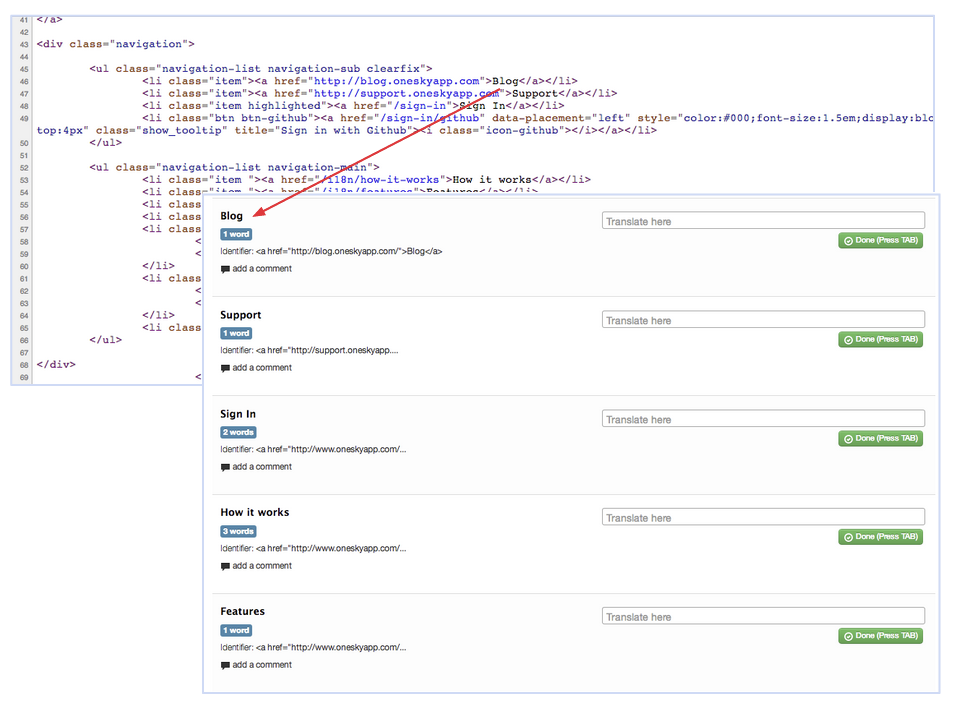
Recently, we have added support for HTML files, including .htm and .html files. With this added support, developers can simply upload their HTML files and our system can parse the files automatically to extract the text that needs to be translated. Developers can then decide whether they would like to order professional translation service from us or invite their own translators (e.g. bilingual staff and/or users) to translate the files. When the translation is done, developers can download the translation in ready-to-use HTML format.


Auto-parsing of HTML files for translation


With this added support for HTML files, file formats that OneSky now supports include:

General Documents

  • Microsoft Word (.doc, .docx)
  • PDF files (.pdf)
  • Excel spreadsheets (.xls, .xlsx, .csv)
  • Powerpoint (.ppt)
  • Rich text format (.rtf)

Software Formats

  • iOS apps (.strings)
  • Android apps (.xml)
  • Windows resource files (.resx, .resjson)
  • Flash (.xml)
  • Gettext (.po, .pot)
  • .properties
  • .json
  • PHP Arrays (.php)
  • Rails apps (.yml, .yaml)
  • Blackberry apps (.rrc)
  • .htm, .html

With our goal to become a comprehensive online translation management platform that you can rely on for your different localization needs, we will continue to add the support for more file formats and channels. If you would like us to support a file format that is not on the above list, send us an email at support@oneskyapp.com 🙂


OneSky (www.oneskyapp.com) is a cloud-based translation management platform with the mission to become the easiest way for companies to go global. We offer advanced technology to streamline the localization process for websites, mobile apps, softwares, social media & documents. 

  • Professional translation service for 40+ languages
  • Manage your own translators & collaborate easily with our web-based translation editor
  • Crowdsourcing solutions to engage your users in the localization process

 Translation made easy – our simple yet powerful promise to you. Contact us at support@oneskyapp.com for more info. 
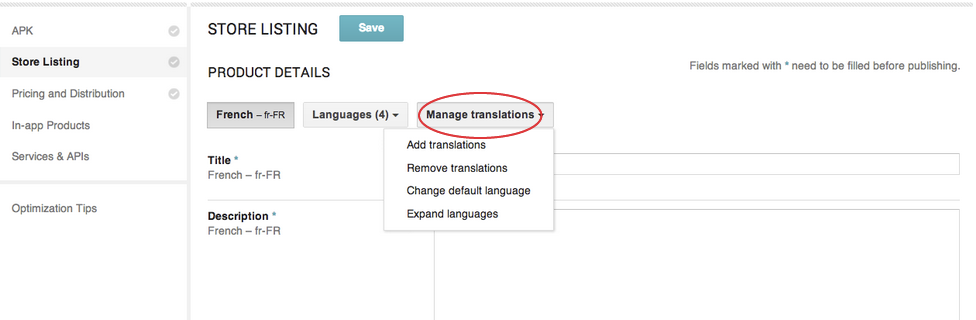


Image courtesy of Stuart Miles at FreeDigitalPhotos.net


How to Add Localized App Descriptions in Google Play

For the latest updates to localizing with Android tools, check out our coverage of Google I/O Developer Conference 2017.

Localize your Google Play store listing to boost downloads

Localizing the Store Listing is a great way to test your international markets before committing your full resources to localize the whole app right from the start. As mentioned in our previous blog post, the top charts of many countries are dominated by apps that offer local language support, indicating that many international markets have a strong preference for local language.

Currently, Google Play allows you to add localized store listings (app descriptions) for 51 languages easily via Android Developers Console. Normally, an app description contains only a few hundred words (as the length limit for your description is currently 4,000 characters as set by Google). So it would be very affordable to translate just your store listing. It’s a great way to test new markets, as research shows people are much more likely to make purchases (and in this case, downloads) in their native language.

In this blog post, we will teach you how to add localized Google Play Store Listing via Android Developers Console.

How to add localized Google Play store listing via Android Developers Console

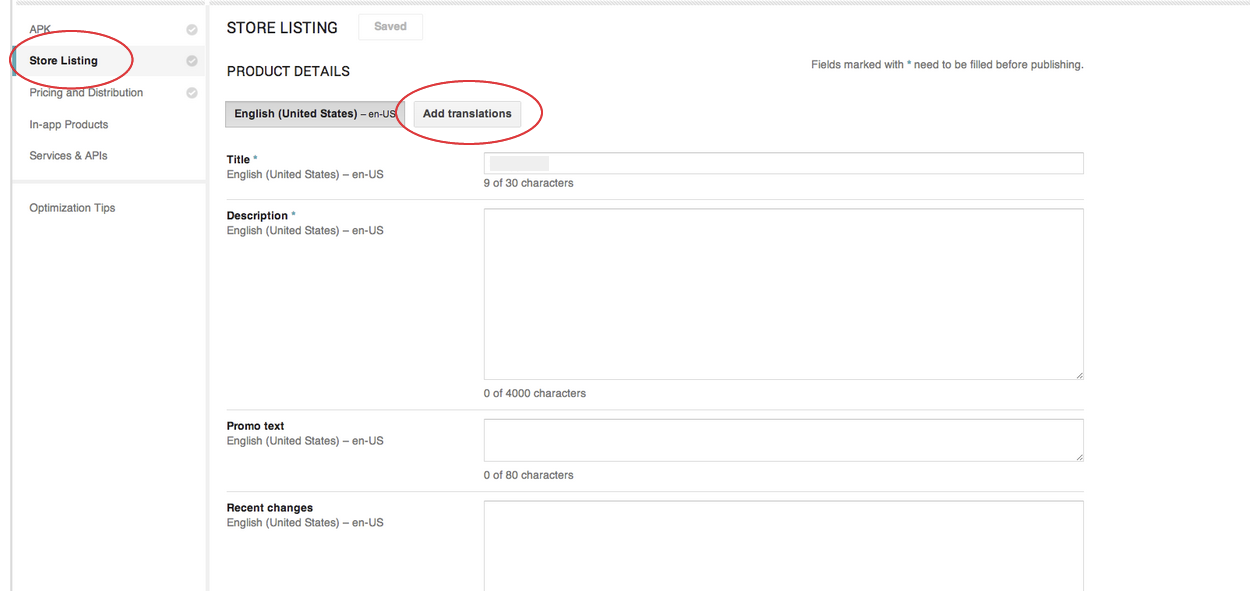
  1. Go to the tab “Store Listing”
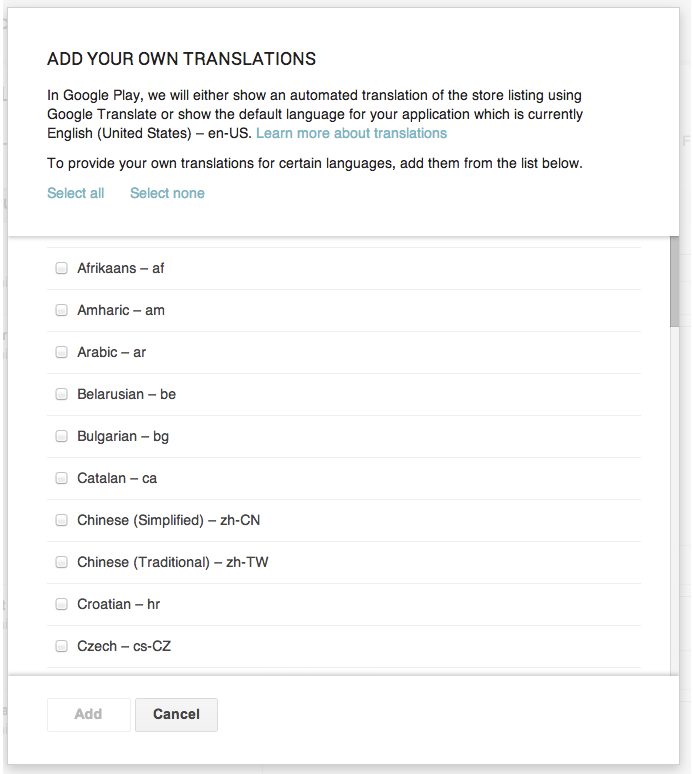
  2. Click “Add translations”Adding Localized Google Play Store Listing (1)
  3. Simply select your target language(s)
    Adding Localized Google Play Store Listing (2)
    * Supported languages include Afrikaans, Amharic, Arabic, Belarusian, Bulgarian, Catalan, Chinese (Simplified), Chinese (Traditional), Croatian, Czech, Danish, Dutch, English (UK), English (US), Estonian, Filipino, Finnish, French, German, Greek, Hebrew, Hindi, Hungarian, Indonesian, Italian, Japanese, Korean, Latvian, Lithuanian, Malay, Norwegian, Persian, Polish, Portuguese (Brazil), Portuguese (Portugal), Romanian, Romansh, Russian, Serbian, Slovak, Slovenian, Spanish (Latin America), Spanish (Spain), Spanish (US), Swahili, Swedish, Thai, Turkish, Ukrainian, Vietnamese and Zulu.
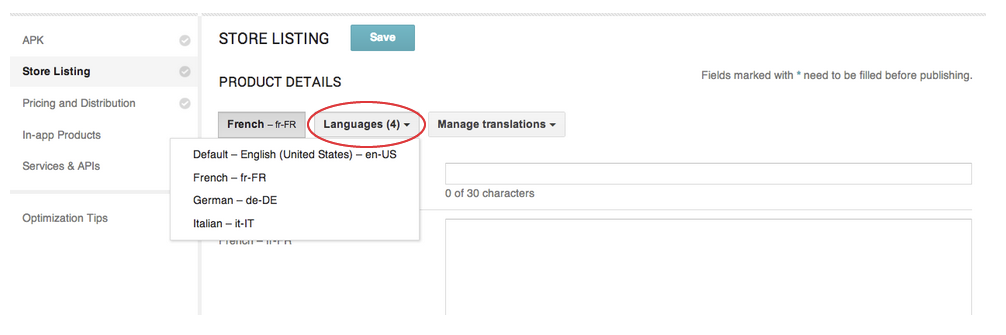
  4. Under “Languages”, you would able to edit the Store Listing of your enabled language(s)Adding Localized Google Play Store Listing (3)
  5. Under “Manage translations”, you would be able to add/remove translations and change your default languageAdding Localized Google Play Store Listing (4)

Should I choose machine translation?

No. In Google Play, users do have the option to view a machine translation if you didn’t localize your store listing. But machine translation is never a good substitute for human translation. This will greatly lower their incentives of downloading your app if they have a preference for local language.

More resources about app store localization

Doing localization right can be tricky, even if the content is as simple as an app store description. That’s why we have prepared several tutorials for you. With these guides, you can learn how to achieve localization success in app store. Access to our free guides by clicking the following links.

Ready to go global?

Figure out what your Minimum Viable Localization (MVL) is and grow globally in a manageable way. Download our free guide (click the banner) to get started today:
Download the eBook now!


OneSky professional translation services: Over 45 Languages!

We are glad to announce that we recently added our 45th language to our language combinations for our professional translation services!

The newly added language is Latvian, which is spoken by approximately 79% of the population of Latvia (source: wikipedia) and is among one of the 51 languages that Google Play supports.

With the addition of Latvian, clients can now order professional translation services for 45 languages on OneSky.

Languages supported by OneSky professional translation services

  • Afrikaans
  • Arabic
  • Bengali
  • Catalan
  • Chinese (Simplified)
  • Chinese (Traditional – Taiwan)
  • Chinese (Traditional – Hong Kong)
  • Czech
  • Danish
  • Dutch
  • English
  • Estonian
  • Finnish
  • French (Canada)
  • French (France)
  • German
  • Greek
  • Hebrew
  • Hindi
  • Hungarian
  • Indonesian
  • Italian
  • Japanese
  • Kannada
  • Korean
  • Latvian
  • Lithuanian
  • Malay
  • Malayalam
  • Norwegian Bokmål
  • Oriya
  • Polish
  • Portuguese (Brazil)
  • Portuguese (Europe)
  • Russian
  • Slovak
  • Spanish (Latin America)
  • Spanish (Spain)
  • Swedish
  • Tagalog
  • Tamil
  • Telugu
  • Thai
  • Turkish
  • Vietnamese


We would continue to expand our language coverage so that we can cover more of your translation needs and help you extend your footprints to more countries globally. If you are in need of professional translation services for a language that is not on the above list, let us know by emailing support@oneskyapp.com and we will add the support as soon as possible.

If you are a translator and would like to become a part of our translation team, feel free to submit an application at translators.recruitment@oneskyapp.com.


OneSky (www.oneskyapp.com) is a cloud-based translation management platform with the mission to become the easiest way for companies to go global. We offer professional translation services for 40+ languages and we are the experts in mobile app, website and software localization. Have your own internal translation team or would like to crowdsource your translation to users? Our online translation collaboration tool helps you save >50% of your time in managing the process. Translation made easy – our simple yet powerful promise to you. 


Amazon has begun its expansion of the Appstore in China

In April, Amazon announced that its Appstore would expand internationally to support nearly 200 countries and developers can submit their apps for distribution in these countries to reach millions more active Amazon customers. And it looks like Amazon has begun this expansion in China already. You can visit Amazon’s China Appstore here.

If you would like to distribute apps on the Amazon Appstore, simply sign up by visiting the Amazon Mobile App Distribution Portal.

Wondering what apps are already utilizing the Amazon’s China Appstore and what apps are popular there? App Annie, a mobile app analytics company, has recently added China to their Store Stats ranking for Amazon. There, you would be able to view the top free apps and top paid apps for China on the Amazon’s Appstore.

Amazon Appstore in China

Translating your apps is important to success in China

As discussed in a previous blog post on the effect of localization, mobile apps users in China have a strong preference for their local language (Simplified Chinese). So a key to success for your mobile apps to enter the China market is to translate your apps.

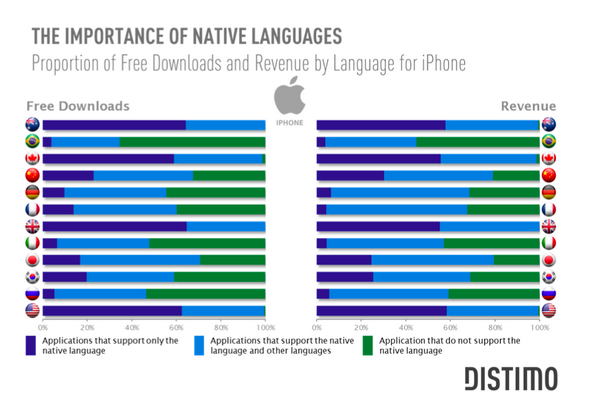
By looking at the chart below that summarizes the importance of localization in different countries, you can see that in many countries, the app top charts are dominated by apps that offer local language support. This applies to both free downloads and revenues generated by apps.

For instance, close to 70% of free downloads in China are from apps that support Simplified Chinese. And if you look at the revenue side, the effect is more prominent – approximately 80% of revenue generated in China are from apps that support Simplified Chinese.


The importance of localizing your apps in different countries


Translating your app can be easy with OneSky, see how.


Preferred translators – a way to ensure consistency for your translations

Ensuring consistency in your translations is important. Having different translations for the same term at different places on your websites or in your mobile apps might not only confuse users, but might also make your apps or websites look unprofessional.

One way to ensure consistency is to set a glossary for your project. Another easier way  is to use the same translator to handle all the translations for the same project. This way, not only the choice of words could be kept consistent, the tone and style of your translations would be more consistent as well.

Historically, OneSky would often try to allocate jobs from the same client to the same translator for consistency purpose. But sometimes it was hard for us to decide for the clients whether we should assign the job to the same translator (which might lengthen the time needed to complete the translation as that translator might be handling another job at that moment) or the fastest translator because for some clients, speed of delivery might be more important than consistency.

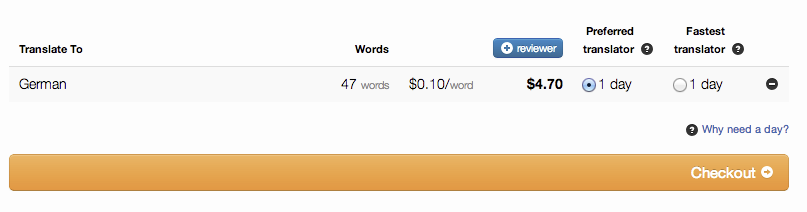
In view of the above, we have added a feature where clients can now indicate their preferences on whether to use the “preferred translator” or the “fastest translator” at checkouts.


preferred translators


A “preferred translator” is the translator who has translated the most number of words for your projects previously.  If you choose to use the “preferred translator”, it might lengthen the turnaround time required to complete your translations (as your preferred translator might be handling other jobs at the moment). But as mentioned, this could often help to ensure the consistency of your translations.

If your deadline is really tight, you can select to use the “fastest translator” instead of your “preferred translator” and we will assign the job to the translator who would be able to start your job the soonest.

Sometimes, you might see the same estimated turnaround time for both “preferred translator” and “fastest translator”. It means your preferred translator is in fact the fastest translator already. So hurray! Both consistency and speed could be achieved and there will be no trade-offs 🙂


Feature Update: Collaborators can now download translations

In the past, only admins would have the rights to download their translations from their projects. But with our recent update, admins can also control whether their collaborators can have the permission to download the translations as well.

For example, if you are using OneSky to crowdsource the translation of an open source project, you might want to grant your collaborators the right to download translations for their own use. This would make the work flow between admins and collaborators to go on smoothly.

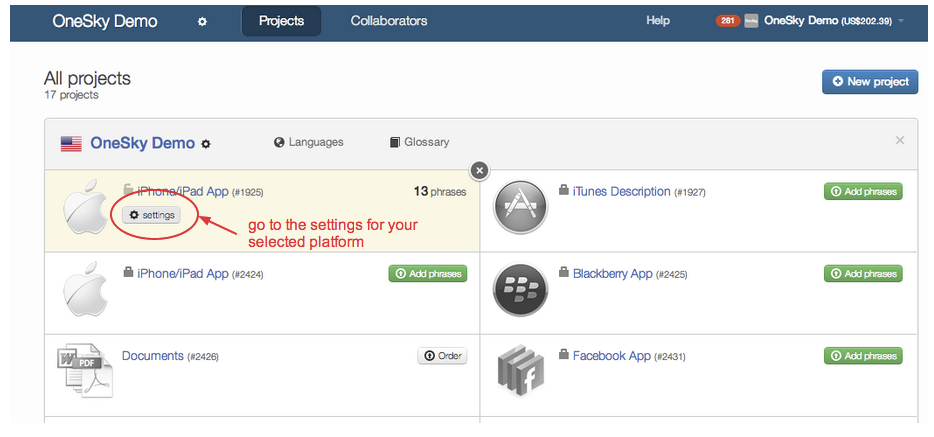
To see how this can be done, simple follow the simple steps as shown below.

To change this setting, go to your “platform settings“.


go to platform settings


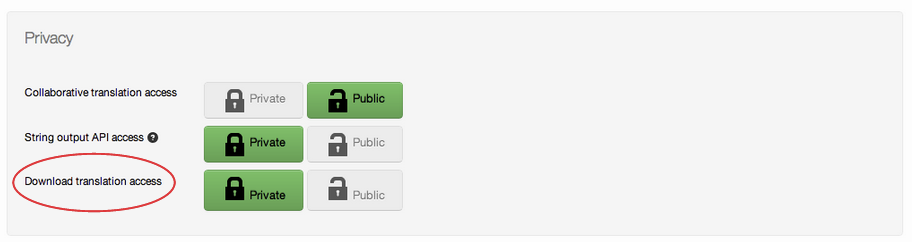
Under “Privacy”,  you can change the access right for downloading translations.

  • If you set this to “private”, your collaborators would not have the right to download translations.
  • If you set this to “public”, your collaborators would have the right to download translations.


download translation access

Admins could easily change the settings whenever they want and is very easily done.

We’re constantly working hard to improve our cloud-based translation management platform. If you have any feature requests / suggestions, feel free to let us know by emailing us at support@oneskyapp.com. It’s always our mission to make translation easy for you!


China overtakes U.S. to become the top smart device market

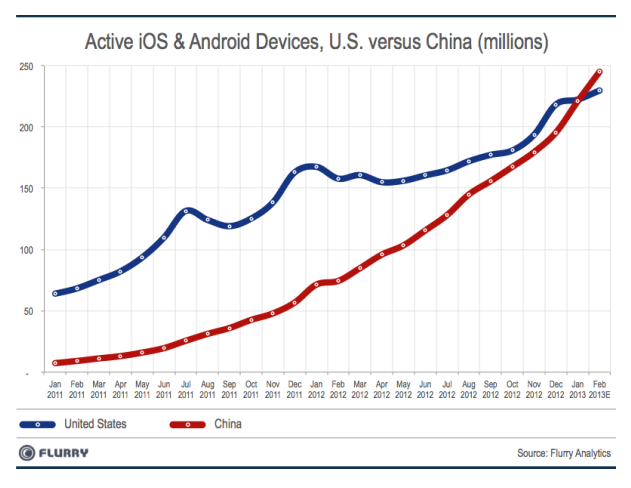
According to the data released by Flurry, China has overtaken the U.S. to become the top smart device market (in terms of the number of active iOS and Android smart device, including both smartphones and tablets) in the world.

In January 2013, the number of active iOS & Android smart devices were roughly the same in China (221 million) and the U.S. (222 million). But with the much faster growth rate in China, Flurry estimated that China would surpass the U.S. by the end of February 2013.

Flurry also commented that they believed China would continue to take the lead due to the huge difference in population for the two countries (China population is over 1.3 billion while the U.S. population is only over 310 million).


Active iOS & Android Devices, U.S. versus China (millions)


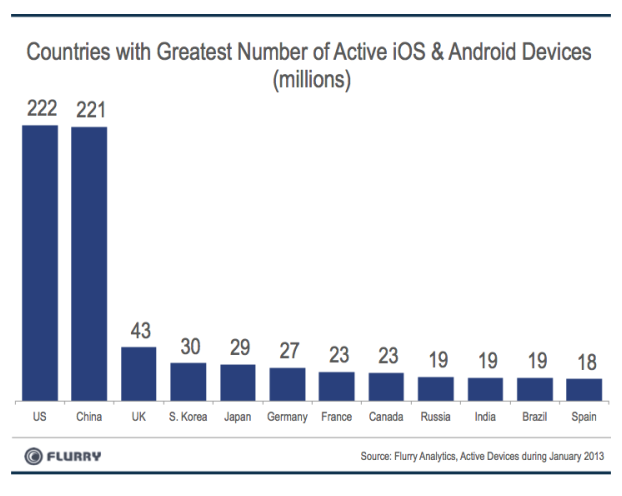
The below chart also shows that the U.S. and China are way ahead of other countries in terms of number of active iOS & Android devices. For instance, the U.S. and China each has over five times the number of active iOS & Android devices when compared to the U.K., which is the third largest smart device market in the world.


Countries with greatest number of active iOS & android devices (smartphones and tablets)


Localizing your app is important to capture the China market

As discussed in our previous blog post, users in China generally prefer apps that support their local language, which is Simplified Chinese. According to the studies by Distimo, roughly 70% of free downloads and roughly 80% of app revenues in China are generated from apps that support Simplified Chinese.

The importance of localizing your apps


Translating your app is easy with OneSky.

  1. Simply upload your resource file (e.g. .strings for iOS apps, .xml for Android apps, etc.)
  2. Select your target language(s) and pay
  3. Download the translation in ready-use resource file format
    • For any subsequent update, simply upload your resource file again and our platform can auto-detect what are new –> never translate the same thing twice!

It’s really that simple! Learn more.


Image courtesy of Deleket at iconarchive.com